variance_filter#
- named_arrays.ndfilters.variance_filter(array, size, where=True, mode='mirror')#
A thin wrapper around
ndfilters.variance_filter()for named arrays.- Parameters:
array (AbstractArray) – The input array to be filtered.
size (dict[str, int]) – The shape of the kernel over which the variance will be calculated.
where (bool | AbstractArray) – A boolean mask used to select which elements of the input array are to be filtered.
mode (Literal['mirror', 'nearest', 'wrap', 'truncate']) – The method used to extend the input array beyond its boundaries. See
scipy.ndimage.generic_filter()for the definitions. Currently, only “mirror”, “nearest”, “wrap”, and “truncate” modes are supported.
- Return type:
Examples
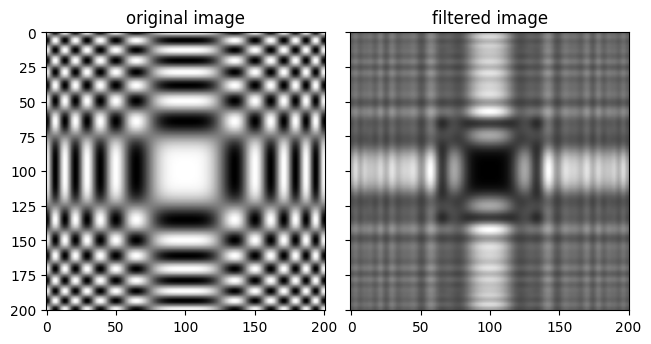
Filter a sample image.
import numpy as np
import matplotlib.pyplot as plt
import named_arrays as na

x = na.linspace(-5, 5, axis="x", num=201)
y = na.linspace(-5, 5, axis="y", num=201)
img = np.cos(np.square(x)) * np.cos(np.square(y))

img_filtered = na.ndfilters.variance_filter(img, size=dict(x=21, y=21))

fig, axs = plt.subplots(
    ncols=2,
    sharex=True,
    sharey=True,
    constrained_layout=True,
)
axs[0].set_title("original image");
na.plt.imshow(
    X=img,
    axis_x="x",
    axis_y="y",
    ax=axs[0],
    cmap="gray",
);
axs[1].set_title("filtered image");
na.plt.imshow(
    X=img_filtered,
    axis_x="x",
    axis_y="y",
    ax=axs[1],
    cmap="gray",
);