transpose_weights_conservative#
- named_arrays.regridding.transpose_weights_conservative(weights, coordinates_input, coordinates_output, axis_input=None, axis_output=None, weights_input=None)#
Transpose weight matrix and normalize to be conservative.
This is a thin wrapper around
regridding.transpose_weights_conservative().- Parameters:
weights (tuple[AbstractScalar, dict[str, int], dict[str, int]]) – Ragged array of weights computed by
weights().coordinates_input (AbstractScalar | AbstractVectorArray) – Coordinates of the input grid.
coordinates_output (AbstractScalar | AbstractVectorArray) – Coordinates of the output grid. Should have the same number of coordinates as the input grid.
axis_input (None | str | Sequence[str]) – Logical axes of the input grid to resample. If
None, resample all the axes of the input grid. The number of axes should be equal to the number of coordinates in the input grid.axis_output (None | str | Sequence[str]) – Logical axes of the output grid corresponding to the resampled axes of the input grid. If
None, all the axes of the output grid correspond to resampled axes in the input grid. The number of axes should be equal to the number of coordinates in the output grid.weights_input (None | AbstractScalar) – The weights that were applied to the input values by
weights(). The transpose inverts this weighting (retaining a factor of1 / weights_input) so that regridding a forward-transformed array with the transposed weights recovers the original input values.
- Return type:
Examples
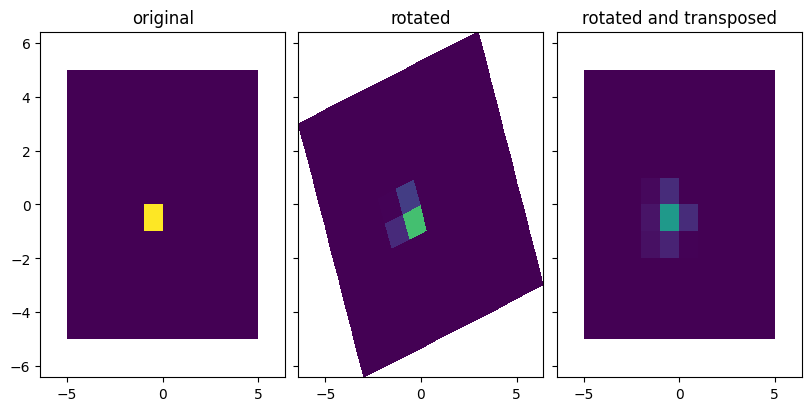
Regrid a 2D array using conservative resampling, and then transform back with transposed_weights.
import matplotlib.pyplot as plt
import named_arrays as na
import astropy.units as u

# Define the number of edges in the input grid
num_x = 11
num_y = 11

# Define a linear grid
coordinates_input = na.Cartesian2dVectorArray(
    x=na.linspace(-5, 5, axis="x", num=num_x),
    y=na.linspace(-5, 5, axis="y", num=num_y),
)

# Define array of values that on grid cell centers
values_input = na.ScalarArray.zeros(shape = dict(x=num_x-1, y=num_y-1))
values_input[dict(x=4,y=4)] = 1

# Rotate grid
rot_matrix = na.Cartesian2dRotationMatrixArray(20*u.deg)
coordinates_output = rot_matrix @ coordinates_input

# Calculate transformation between input and output coordinates:
weights = na.regridding.weights(
    coordinates_input=coordinates_input,
    coordinates_output=coordinates_output,
    method="conservative",
)

# Regrid values onto output coordinates
values_output = na.regridding.regrid_from_weights(
    *weights,
    values_input=values_input
)

# Transpose weights
weights_transposed = na.regridding.transpose_weights_conservative(
    weights=weights,
    coordinates_input=coordinates_input,
    coordinates_output=coordinates_output,
)

# Regrid the regridded values back onto original grid using transposed weights.
values_transposed = na.regridding.regrid_from_weights(
    *weights_transposed,
    values_input=values_output
)

# Plot the original and regridded arrays of values
fig, ax = plt.subplots(
    ncols=3,
    sharex=True,
    sharey=True,
    figsize=(8, 4),
    constrained_layout=True,
);
na.plt.pcolormesh(coordinates_input, C=values_input, ax=ax[0], vmin=0, vmax=1)
na.plt.pcolormesh(coordinates_output, C=values_output, ax=ax[1], vmin=0, vmax=1)
na.plt.pcolormesh(coordinates_input, C=values_transposed, ax=ax[2], vmin=0, vmax=1)
ax[0].set_title("original");
ax[1].set_title("rotated");
ax[2].set_title("rotated and transposed");