convolve#
- named_arrays.convolve(array, kernel, axis=None, where=True, mode='truncate')#
Convolve an array with a given \(n\)-dimensional kernel.
- Parameters:
array (int | float | complex | ndarray | Quantity | AbstractArray) – The input array to be convolved. The shape of this array must contain all the axes in axis.
kernel (AbstractArray) – The convolution kernel.
axis (None | str | Sequence[str]) – The logical axes along which to perform the convolution. If
None(the default), the convolution will be computed along all the axes of kernel.where (bool | AbstractArray) – An optional mask that can be used to exclude elements of array during the convolution operation.
mode (str) – The method used to extend the array beyond its boundaries. Same options as
ndfilters.convolve().
- Return type:
Examples
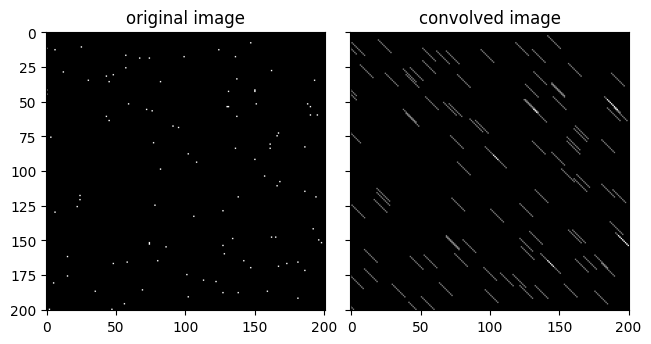
Create a test image and convolve it with an example kernel.
import matplotlib.pyplot as plt
import named_arrays as na

# Define a test image of randomly-positioned
# delta functions
shape_stars = dict(star=101)
index = dict(
    x=na.random.uniform(0, 201, shape_stars).astype(int),
    y=na.random.uniform(0, 201, shape_stars).astype(int),
)
img = na.ScalarArray.zeros(dict(x=201, y=201))
img[index] = 1

# Define an example kernel consisting of a diagonal matrix
kernel = na.arange(0, 10, axis="x") == na.arange(0, 10, axis="y")

# Convolve the test image with the kernel
img_conv = na.convolve(img, kernel)

# Plot the result
fig, axs = plt.subplots(
    ncols=2,
    sharex=True,
    sharey=True,
    constrained_layout=True,
)
axs[0].set_title("original image");
na.plt.imshow(
    X=img,
    axis_x="x",
    axis_y="y",
    ax=axs[0],
    cmap="gray",
);
axs[1].set_title("convolved image");
na.plt.imshow(
    X=img_conv,
    axis_x="x",
    axis_y="y",
    ax=axs[1],
    cmap="gray",
);