ScalarArrayRange#
- class named_arrays.ScalarArrayRange(start, stop, axis, step=1)#
Bases:
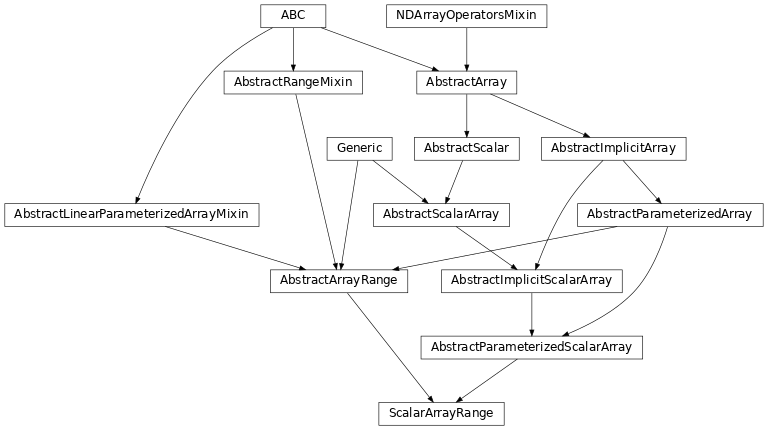
AbstractParameterizedScalarArray,AbstractArrayRange[ScalarStartT,ScalarStopT]An
AbstractScalarArrayover the range [start,stop) incremented bystep. An analog tonumpy.arange().ScalarArrayRangecan be used to create aScalarArrayof integers.import named_arrays as na x = na.ScalarArrayRange(1, 8, axis = "x") print(x.explicit) print(x.shape)
ScalarArray(
    ndarray=[1, 2, 3, 4, 5, 6, 7],
    shape={'x': 7},
)
{'x': 7}
Note above that
xdoes not includestop, and won’t in almost all cases.ScalarArrayRangecan be used to create an increasingScalarArrayof floats, even with non integer steps.x = na.ScalarArrayRange(-0.5, 3, "x", 0.25) print(x.explicit)
ScalarArray(
    ndarray=[-0.5 , -0.25,  0.  ,  0.25,  0.5 ,  0.75,  1.  ,  1.25,  1.5 ,  1.75,  2.  ,  2.25,  2.5 ,  2.75],
    shape={'x': 14},
)
For the above, and more complicated uses, it is recommended to use
ScalarLinearSpaceinstead. See numpy documentation ofnumpy.arange()for more info.Attributes
A
tupleofstrrepresenting the names of each dimension of this array.if this array has multiple components, broadcast them against each other.
Data type of the array.
Converts this array to an instance of
named_arrays.AbstractExplicitArray.Compute the index of each element of this array.
L2-norm of this array.
Underlying data that is wrapped by this class.
Number of dimensions of the array.
Number of elements in the parameterization
The number of elements along each axis of the array.
Total number of elements in the array.
Cast
ScalarArrayto axarray.DataArray.The
named_arrays.AbstractArraytype corresponding to this array.The
named_arrays.AbstractExplicitArraytype corresponding to this array.Unit associated with the array.
Similar to
unitbut returnsastropy.units.dimensionless_unscaledifndarrayis not an instance ofastropy.units.Quantity.Returns a new array with its units removed, if they exist.
Methods
__init__(start, stop, axis[, step])add_axes(axes)Add new singleton axes to this array.
all([axis, where])Return
Trueif all of the elements along the given axes areTrue.any([axis, where])Return
Trueif any of the elements along the given axes areTrue.astype(dtype[, order, casting, subok, copy])Copy of the array cast to a specific data type.
broadcast_to(shape[, append])A new view of this array with the specified shape.
cell_centers([axis, random, seed])Convert an array from cell vertices to cell centers.
change_axis_index(axis, index)Change the position of an axis in this array.
combine_axes([axes, axis_new])Combine some of the axes of the array into a single new axis.
copy()Create a deep copy of this array.
Create a shallow copy of this array.
debroadcast([axes])Remove redundant axes introduced by broadcasting.
filter_median(shape_kernel[, mode])index(value[, axis])index_secant(value[, axis])interp_linear(item)Linearly interpolate this array to find its value at the given fractional index.
isel(**item)Index this array along named axes given as keyword arguments.
matrix_determinant(axis_rows, axis_columns)matrix_inverse(axis_rows, axis_columns)matrix_multiply(other, axis_rows, axis_columns)max([axis, initial, where])The maximum value of this array along the given axes.
mean([axis, where])The mean value of this array along the given axes.
mean_trimmed([q, axis])Compute the trimmed mean along the specified axes.
median([axis])The median value of this array along the given axes.
min([axis, initial, where])The minimum value of this array along the given axes.
ndarray_aligned(axes)Align
ndarrayto a particular sequence of axes.ndindex([axis_ignored])An iterator that yields the index of each element of this array.
percentile(q[, axis, out, overwrite_input, ...])The requested percentile of this array along the given axes.
ptp([axis])The peak-to-peak value of this array along the given axes.
replace(**changes)A method version of
dataclasses.replace()for named arrays.reshape(shape)Reorganize this array into a new shape.
rms([axis, where])The root-mean-square of this array along the given axes.
std([axis, where])The standard deviation of this array along the given axes.
sum([axis, where])The sum of each element of this array along the given axes.
take_along_axis(indices, axis)Take values from this array by matching
indicesalongaxis.to(unit[, equivalencies, copy])Convert this array to a new unit.
to_string([prefix, multiline])Convert this array instance to a string representation.
to_string_array([format_value, format_unit, ...])Convert to an array of strings where each string has an appropriately-formatted unit attached to the value.
to_value(unit[, equivalencies])The numerical value of this array, possibly in a different unit.
transpose([axes])Reorder the axes of this array to the given sequence.
var([axis, where])The variance of this array along the given axes.
vmr([axis, where])The variance-to-mean ratio of this array along the given axes.
volume_cell(axis)Computes the n-dimensional volume of each cell formed by interpreting this array as a logically-rectangular grid of vertices.
Inheritance Diagram
- Parameters:
start (StartT)
stop (StopT)
axis (str | AbstractArray)
step (int | float | AbstractArray)
- add_axes(axes)#
Add new singleton axes to this array.
- Parameters:
- Return type:
See also
named_arrays.add_axes()A functional version of this method.
- all(axis=None, where=<no value>)#
Return
Trueif all of the elements along the given axes areTrue.- Parameters:
- Return type:
See also
numpy.all()A functional version of this method.
- any(axis=None, where=<no value>)#
Return
Trueif any of the elements along the given axes areTrue.- Parameters:
- Return type:
See also
numpy.any()A functional version of this method.
- astype(dtype, order='K', casting='unsafe', subok=True, copy=True)#
Copy of the array cast to a specific data type.
Equivalent to
numpy.ndarray.astype().
- broadcast_to(shape, append=False)#
A new view of this array with the specified shape.
- Parameters:
- Return type:
See also
named_arrays.broadcast_to()A functional version of this method.
- cell_centers(axis=None, random=False, seed=None)#
Convert an array from cell vertices to cell centers.
- Parameters:
axis (None | str | Sequence[str]) – The axes of the array to average over.
random (bool) – If true, select a random point within each cell instead of the geometric center.
seed (None | int) – The seed of the random sampling, which has an effect only where
randomis true. IfNone(the default), the sampling differs from one call to the next, and anything computed from it cannot be reproduced.
- Return type:
- change_axis_index(axis, index)#
Change the position of an axis in this array.
- Parameters:
- Return type:
- combine_axes(axes=None, axis_new=None)#
Combine some of the axes of the array into a single new axis.
- debroadcast(axes=None)#
Remove redundant axes introduced by broadcasting.
- Parameters:
- Return type:
See also
named_arrays.debroadcast()A functional version of this method.
- filter_median(shape_kernel, mode='reflect')#
- index(value, axis=None)#
- index_secant(value, axis=None)#
- interp_linear(item)#
Linearly interpolate this array to find its value at the given fractional index.
- isel(**item)#
Index this array along named axes given as keyword arguments.
This is a convenience wrapper around
__getitem__():a.isel(x=0)is equivalent toa[dict(x=0)].Since keyword-argument names must be valid Python identifiers, axes whose names are not valid identifiers can only be indexed using the
dictform,a[{...}].- Parameters:
item (int | slice | AbstractArray) – The index to apply along each named axis.
self (Self)
- Return type:
- matrix_determinant(axis_rows, axis_columns)#
- Parameters:
- Return type:
- matrix_inverse(axis_rows, axis_columns)#
- Parameters:
- Return type:
- matrix_multiply(other, axis_rows, axis_columns)#
- Parameters:
self (Self)
other (AbstractScalar)
axis_rows (str)
axis_columns (str)
- Return type:
- max(axis=None, initial=<no value>, where=<no value>)#
The maximum value of this array along the given axes.
- Parameters:
- Return type:
See also
numpy.max()A functional version of this method.
- mean(axis=None, where=<no value>)#
The mean value of this array along the given axes.
- Parameters:
- Return type:
See also
numpy.mean()A functional version of this method.
- mean_trimmed(q=0.25, axis=None)#
Compute the trimmed mean along the specified axes.
- Parameters:
q (float) – The fraction of the largest and smallest elements to remove. Must be between 0 and 1/2. If the specified fraction does not result in an integer number of elements, the number of elements to trim is rounded down.
axis (None | str | Sequence[str]) – The axis or axes along which to compute the trimmed mean.
- Return type:
See also
- median(axis=None)#
The median value of this array along the given axes.
- Parameters:
axis (None | str | Sequence[str]) – The logical axis or axes along which the operation is computed.
See also
numpy.median()A functional version of this method.
- min(axis=None, initial=<no value>, where=<no value>)#
The minimum value of this array along the given axes.
- Parameters:
- Return type:
See also
numpy.min()A functional version of this method.
- ndarray_aligned(axes)#
Align
ndarrayto a particular sequence of axes.- Parameters:
- Return type:
An instance of
numpy.ndarraywith the axes aligned.
- ndindex(axis_ignored=None)#
An iterator that yields the index of each element of this array.
- Parameters:
- Return type:
See also
named_arrays.ndindex()A functional version of this method.
- percentile(q, axis=None, out=None, overwrite_input=False, method='linear', keepdims=False)#
The requested percentile of this array along the given axes.
- Parameters:
q (int | float | Quantity | Self) – The percentile to compute.
axis (None | str | Sequence[str]) – The logical axis or axes along which the operation is computed.
out (None | Self) – An optional output array in which to place the result.
overwrite_input (bool) – Whether to overwrite the input array.
method (str) – How to interpolate the result.
keepdims (bool) – A boolean flag indicating whether to keep the reduced dimensions.
self (Self)
See also
numpy.percentile()A functional version of this method.
- ptp(axis=None)#
The peak-to-peak value of this array along the given axes.
- Parameters:
- Return type:
See also
numpy.ptp()A functional version of this method.
- replace(**changes)#
A method version of
dataclasses.replace()for named arrays.- Parameters:
changes – The fields of the dataclass to be overwritten
- Return type:
- reshape(shape)#
Reorganize this array into a new shape.
- rms(axis=None, where=<no value>)#
The root-mean-square of this array along the given axes.
- std(axis=None, where=<no value>)#
The standard deviation of this array along the given axes.
- Parameters:
- Return type:
See also
numpy.std()A functional version of this method.
- sum(axis=None, where=<no value>)#
The sum of each element of this array along the given axes.
- Parameters:
- Return type:
See also
numpy.sum()A functional version of this method.
- take_along_axis(indices, axis)#
Take values from this array by matching
indicesalongaxis.- Parameters:
indices (AbstractArray) – The integer indices to take along
axis.axis (str) – The axis of this array along which the values are taken.
self (Self)
- Return type:
See also
named_arrays.take_along_axis()A functional version of this method.
- to(unit, equivalencies=[], copy=True)#
Convert this array to a new unit.
Equivalent to
astropy.units.Quantity.to().
- to_string(prefix=None, multiline=None)#
Convert this array instance to a string representation.
- to_string_array(format_value='%.2f', format_unit='latex_inline', pad_unit='$\\,$')#
Convert to an array of strings where each string has an appropriately-formatted unit attached to the value.
- to_value(unit, equivalencies=[])#
The numerical value of this array, possibly in a different unit.
Equivalent to
astropy.units.Quantity.to_value().
- transpose(axes=None)#
Reorder the axes of this array to the given sequence.
- Parameters:
- Return type:
See also
numpy.transpose()The
numpyversion of this method.
- var(axis=None, where=<no value>)#
The variance of this array along the given axes.
- Parameters:
- Return type:
See also
numpy.var()A functional version of this method.
- vmr(axis=None, where=<no value>)#
The variance-to-mean ratio of this array along the given axes.
- volume_cell(axis)#
Computes the n-dimensional volume of each cell formed by interpreting this array as a logically-rectangular grid of vertices.
Note that this method is usually only used for sorted arrays.
If self is a scalar, this method computes the length of each edge, and is equivalent to
numpy.diff(). If self is a 2d vector, this method computes the area of each quadrilateral, and if self is a 3d vector, this method computes the volume of each cuboid.
- property axes: tuple[str, ...]#
A
tupleofstrrepresenting the names of each dimension of this array.Must have the same length as the number of dimensions of this array.
- property axes_flattened: str#
Combine
axesinto a singlestr.This is useful for functions like
numpy.flatten()which returns an array with only one dimension.
- axis: str | AbstractArray = <dataclasses._MISSING_TYPE object>#
- property broadcasted: AbstractExplicitArray#
if this array has multiple components, broadcast them against each other.
Equivalent to
a.broadcast_to(a.shape).
- property dtype: dtype#
Data type of the array. Equivalent to
numpy.ndarray.dtype
- property explicit: AbstractExplicitArray#
Converts this array to an instance of
named_arrays.AbstractExplicitArray.
- property indices: dict[str, ScalarArrayRange]#
Compute the index of each element of this array.
See also
named_arrays.indices()A functional version of this method.
- property length: AbstractScalar#
L2-norm of this array.
- property ndarray: int | float | complex | ndarray | Quantity#
Underlying data that is wrapped by this class.
This is usually an instance of
numpy.ndarrayorastropy.units.Quantity, but it can also be a built-in python type such as aint,float, orbool
- property ndim: int#
Number of dimensions of the array. Equivalent to
numpy.ndarray.ndim.
- property range: AbstractArray#
- property shape: dict[str, int]#
The number of elements along each axis of the array. Analogous to
numpy.ndarray.shapebut represented as adictwhere the keys are the axis names and the values are the axis sizes.
- property size: int#
Total number of elements in the array. Equivalent to
numpy.ndarray.size
- start: StartT = <dataclasses._MISSING_TYPE object>#
- step: int | float | AbstractArray = 1#
- stop: StopT = <dataclasses._MISSING_TYPE object>#
- property to_xarray: xr.DataArray#
Cast
ScalarArrayto axarray.DataArray. Useful for saving to netcdf/zarr or using Dask.
- property type_abstract: Type[AbstractScalarArray]#
The
named_arrays.AbstractArraytype corresponding to this array.
- property type_explicit: Type[ScalarArray]#
The
named_arrays.AbstractExplicitArraytype corresponding to this array.
- property unit: None | UnitBase#
Unit associated with the array.
If
ndarrayis an instance ofastropy.units.Quantity, returnastropy.units.Quantity.unit, otherwise returnNone.
- property unit_normalized: UnitBase#
Similar to
unitbut returnsastropy.units.dimensionless_unscaledifndarrayis not an instance ofastropy.units.Quantity.
- property value: ScalarArray#
Returns a new array with its units removed, if they exist.
The family is preserved, so a vector returns a vector and a function array returns a function array, but the result is always explicit: an implicit array materializes into its family’s explicit type.