regrid#
- named_arrays.regridding.regrid(coordinates_input, coordinates_output, values_input, axis_input=None, axis_output=None, method='multilinear', perturb=None, seed=42)#
Regrid an array of values defined on a logically-rectangular curvilinear grid onto a new logically-rectangular curvilinear grid.
- Parameters:
coordinates_input (AbstractScalar | AbstractVectorArray) – Coordinates of the input grid.
coordinates_output (AbstractScalar | AbstractVectorArray) – Coordinates of the output grid. Should have the same number of components as the input grid.
values_input (AbstractScalarArray) – Input array of values to be resampled.
axis_input (None | Sequence[str]) – Logical axes of the input grid to resample. If
None, resample all the axes of the input grid. The number of axes should be equal to the number of coordinates in the input grid.axis_output (None | Sequence[str]) – Logical axes of the output grid corresponding to the resampled axes of the input grid. If
None, all the axes of the output grid correspond to resampled axes in the input grid. The number of axes should be equal to the number of coordinates in the output grid.method (Literal['multilinear', 'conservative']) – The type of regridding to use.
perturb (None | bool) – Whether to perturb coordinates_output by a small value to avoid degenerate grids. This is helpful for some methods, like
conservative, which sometimes cannot handle degenerate grids. IfNone(the default), no perturbation is applied unless method isconservativeand the dimensions of the grid are 2D or higher. IfTrue, each point is perturbed using a normal distribution with standard deviation equal to1e-9of the grid width.seed (None | int | Generator) – The seed used by the pseudo-random number generator which perturbs coordinates_output. May be an integer or an instance of
numpy.random.Generator. The default is a fixed integer, so that repeated calls using the same grids return identical results. IfNone, the generator is seeded from fresh entropy, and each call draws an independent perturbation.
- Return type:
Examples
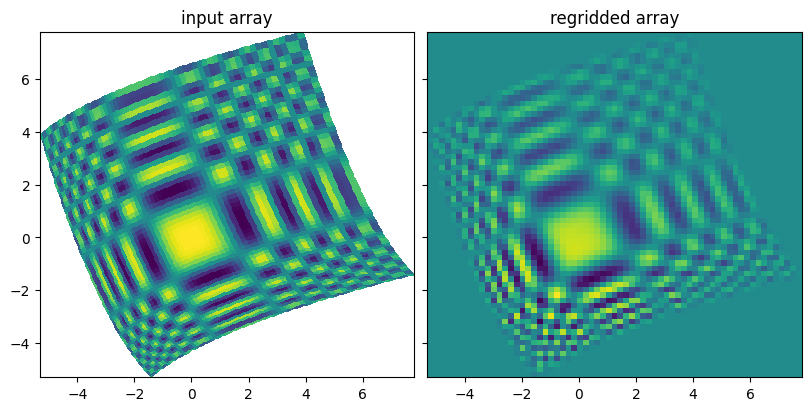
Regrid a 2D array using conservative resampling.
import numpy as np
import matplotlib.pyplot as plt
import named_arrays as na

# Define the number of edges in the input grid
num_x = 66
num_y = 66

# Define a dummy linear grid
x = na.linspace(-5, 5, axis="x", num=num_x)
y = na.linspace(-5, 5, axis="y", num=num_y)

# Define the curvilinear input grid using the dummy grid
angle = 0.4
coordinates_input = na.Cartesian2dVectorArray(
    x=x * np.cos(angle) - y * np.sin(angle) + 0.05 * x * x,
    y=x * np.sin(angle) + y * np.cos(angle) + 0.05 * y * y,
)

# Define the test pattern
a_input = np.cos(np.square(x)) * np.cos(np.square(y))
a_input = a_input.cell_centers()

# Define a rectilinear output grid using the limits of the input grid
coordinates_output = na.Cartesian2dVectorLinearSpace(
    start=coordinates_input.min(),
    stop=coordinates_input.max(),
    axis=na.Cartesian2dVectorArray("x2", "y2"),
    num=66,
)

# Regrid the test pattern onto the new grid
a_output = na.regridding.regrid(
    coordinates_input=coordinates_input,
    coordinates_output=coordinates_output,
    values_input=a_input,
    method="conservative",
)

fig, ax = plt.subplots(
    ncols=2,
    sharex=True,
    sharey=True,
    figsize=(8, 4),
    constrained_layout=True,
);
na.plt.pcolormesh(coordinates_input, C=a_input, ax=ax[0])
na.plt.pcolormesh(coordinates_output, C=a_output, ax=ax[1])
ax[0].set_title("input array");
ax[1].set_title("regridded array");