dimension_angular#
- named_arrays.plt.dimension_angular(center, radius, angle_a, angle_b, radius_inner=0, angle_label=None, label=None, decimals=1, gap=0.1, num=101, ax=None, components=None, arrowstyle='->', kwargs_extension=None, kwargs_dimension=None, kwargs_text=None, **kwargs)#
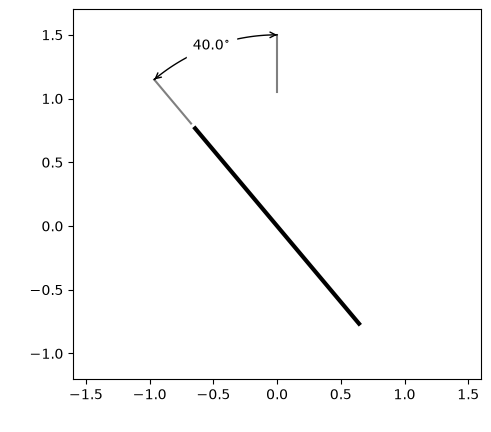
Annotate the angle between two directions like a mechanical drawing.
The counterpart of
dimension()for angles. An arc with an arrowhead at each end is drawn around center at a distance radius, from the direction angle_a to the direction angle_b, and each end of the arc is joined back towards center by an extension line. The extension lines stop short of radius_inner, so that they can begin at the edge of the component whose angle is being dimensioned rather than at its center.- Parameters:
center (na.AbstractCartesian2dVectorArray) – The vertex of the angle, in data coordinates.
radius (float | u.Quantity | na.AbstractScalar) – The distance from center to the arc, in data coordinates.
angle_a (u.Quantity | na.AbstractScalar) – The direction of one side of the angle, measured counterclockwise from the horizontal axis. Angles without units are in radians.
angle_b (u.Quantity | na.AbstractScalar) – The direction of the other side of the angle, measured the same way.
radius_inner (float | u.Quantity | na.AbstractScalar) – How far from center the component being dimensioned extends, in data coordinates. The extension lines begin a gap beyond it.
angle_label (None | u.Quantity | na.AbstractScalar) – The direction from center in which the label is drawn, at a distance radius. If
None, the label is drawn at the middle of the arc. Move it off the arc when the arc is too short to hold it.label (None | str | na.AbstractScalar) – The text label for the dimension. If
None, the size of the angle \(|b - a|\) in degrees, rounded to decimals places and followed by a degree sign, is used.decimals (int) – The number of decimal places to round the default label to. Ignored if label is given explicitly.
gap (float | na.AbstractScalar) – The fraction of the distance from radius_inner to radius to leave as a gap before the start of each extension line, matching the convention of a mechanical drawing.
num (int) – The number of points the arc is drawn through, at least 3 so that it bends.
ax (None | matplotlib.axes.Axes | na.AbstractScalar) – A matplotlib axes instance on which to plot the dimension.
components (None | tuple[str, str]) – If center has more than two components, use this argument to specify which components correspond to the horizontal and vertical positions.
arrowstyle (str) – The
matplotlib.patches.ArrowStyleof the arrowhead drawn at each end of the arc, pointing outwards along the arc. Each end is drawn as an arrow of its own, along the last segment of the arc, so a style with a head at one end, like the default"->"or"-|>", gives the arc one head at each end. A style with a head at both ends, like"<->", gives each end of the arc a second head, which points back along it. Use"-"to draw the arc without heads.kwargs_extension (None | dict[str, Any]) – Additional keyword arguments passed to
plot()when drawing the extension lines.kwargs_dimension (None | dict[str, Any]) – Additional keyword arguments passed to
plot()when drawing the arc. The arrowheads are drawn with every one of them which an arrow has too, like the color, the line width and the transparency of the arc, and at its zorder, and anarrowpropsentry is passed toannotate()when drawing them.kwargs_text (None | dict[str, Any]) – Additional keyword arguments passed to
text()when drawing the label.kwargs – Additional keyword arguments passed to
plot()andtext().
- Return type:
na.ScalarArray[npt.NDArray[None | matplotlib.artist.Artist]]
Notes
The angles are measured in data coordinates, so the drawing is only true to them on axes with an equal aspect ratio, which is what a mechanical drawing uses.
- Return type:
The array of lines representing the arcs.
- Parameters:
center (na.AbstractCartesian2dVectorArray)
radius (float | u.Quantity | na.AbstractScalar)
angle_a (u.Quantity | na.AbstractScalar)
angle_b (u.Quantity | na.AbstractScalar)
radius_inner (float | u.Quantity | na.AbstractScalar)
angle_label (None | u.Quantity | na.AbstractScalar)
label (None | str | na.AbstractScalar)
decimals (int)
gap (float | na.AbstractScalar)
num (int)
ax (None | matplotlib.axes.Axes | na.AbstractScalar)
arrowstyle (str)
Examples
Dimension how far a plate is tilted from the vertical.
import numpy as np
import matplotlib.pyplot as plt
import astropy.units as u
import named_arrays as na

center = na.Cartesian2dVectorArray(0, 0)
tilt = 40 * u.deg
half_length = 1

fig, ax = plt.subplots()
na.plt.plot(
    na.linspace(-1, 1, axis="plate", num=2) * half_length * -np.sin(tilt),
    na.linspace(-1, 1, axis="plate", num=2) * half_length * np.cos(tilt),
    ax=ax,
    axis="plate",
    color="black",
    linewidth=3,
)
ax.set_aspect("equal")
ax.set_xlim(-1.6, 1.6)
ax.set_ylim(-1.2, 1.7)
na.plt.dimension_angular(
    center=center,
    radius=1.5 * half_length,
    angle_a=90 * u.deg,
    angle_b=90 * u.deg + tilt,
    radius_inner=half_length,
    ax=ax,
);