AbstractFunctionArray#
- class named_arrays.AbstractFunctionArray#
Bases:
AbstractArrayAttributes
A
tupleofstrrepresenting the names of each dimension of this array.Return keys corresponding to all input axes representing bin centers
Return keys corresponding to all input axes representing bin vertices
if this array has multiple components, broadcast them against each other.
Converts this array to an instance of
named_arrays.AbstractExplicitArray.Compute the index of each element of this array.
The arrays representing the inputs to this function.
L2-norm of this array.
Number of dimensions of the array.
The arrays representing the outputs of this function.
The number of elements along each axis of the array.
Total number of elements in the array.
The
named_arrays.AbstractArraytype corresponding to this array.The
named_arrays.AbstractExplicitArraytype corresponding to this array.Returns a new array with its units removed, if they exist.
Methods
__init__()add_axes(axes)Add new singleton axes to this array.
all([axis, where])Return
Trueif all of the elements along the given axes areTrue.any([axis, where])Return
Trueif any of the elements along the given axes areTrue.astype(dtype[, order, casting, subok, copy])Copy of the array cast to a specific data type.
broadcast_to(shape[, append])A new view of this array with the specified shape.
cell_centers([axis, random, seed])Convert an array from cell vertices to cell centers.
combine_axes([axes, axis_new])Combine some of the axes of the array into a single new axis.
copy()Create a deep copy of this array.
Create a shallow copy of this array.
debroadcast([axes])Remove redundant axes introduced by broadcasting.
gradient(axis[, component, edge_order])Differentiate the outputs with respect to the inputs along
axis.index(value[, axis])index_secant(value[, axis])integrate(axis[, component])Integrate the outputs over the given input
axisor axes.interp_linear(item)Linearly interpolate this array to find its value at the given fractional index.
isel(**item)Index this array along named axes given as keyword arguments.
max([axis, initial, where])The maximum value of this array along the given axes.
mean([axis, where])The mean value of this array along the given axes.
median([axis])The median value of this array along the given axes.
min([axis, initial, where])The minimum value of this array along the given axes.
ndindex([axis_ignored])An iterator that yields the index of each element of this array.
pcolormesh(axs, input_component_x, ...[, ...])Plot a
FunctionArrayviamatplotlib.pyplot.pcolormesh().percentile(q[, axis, out, overwrite_input, ...])The requested percentile of this array along the given axes.
ptp([axis])The peak-to-peak value of this array along the given axes.
regrid(inputs[, axis, method, bounds, weights])Resample this function array onto a new set of input coordinates using
named_arrays.regridding.regrid().replace(**changes)A method version of
dataclasses.replace()for named arrays.reshape(shape)Reorganize this array into a new shape.
rms([axis, where])The root-mean-square of this array along the given axes.
std([axis, where])The standard deviation of this array along the given axes.
sum([axis, where])The sum of each element of this array along the given axes.
take_along_axis(indices, axis)Take values from this array by matching
indicesalongaxis.to(unit[, equivalencies, copy])Convert this array to a new unit.
to_string([prefix, multiline])Convert this array instance to a string representation.
to_string_array([format_value, format_unit, ...])Convert to an array of strings where each string has an appropriately-formatted unit attached to the value.
to_value(unit[, equivalencies])The numerical value of this array, possibly in a different unit.
transpose([axes])Reorder the axes of this array to the given sequence.
var([axis, where])The variance of this array along the given axes.
vmr([axis, where])The variance-to-mean ratio of this array along the given axes.
volume_cell(axis)Computes the n-dimensional volume of each cell formed by interpreting this array as a logically-rectangular grid of vertices.
weights(inputs[, axis, method, bounds])Compute the resampling weights of this array using
named_arrays.regridding.weights().Inheritance Diagram
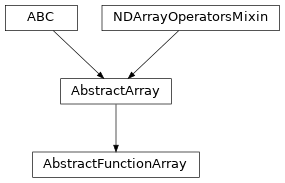
- add_axes(axes)#
Add new singleton axes to this array.
- Parameters:
axes (str | Sequence[str]) – Either a single axis name or a sequence of axis names add to this array.
- Return type:
See also
named_arrays.add_axes()A functional version of this method.
- all(axis=None, where=<no value>)#
Return
Trueif all of the elements along the given axes areTrue.- Parameters:
- Return type:
See also
numpy.all()A functional version of this method.
- any(axis=None, where=<no value>)#
Return
Trueif any of the elements along the given axes areTrue.- Parameters:
- Return type:
See also
numpy.any()A functional version of this method.
- astype(dtype, order='K', casting='unsafe', subok=True, copy=True)#
Copy of the array cast to a specific data type.
Equivalent to
numpy.ndarray.astype().
- broadcast_to(shape, append=False)#
A new view of this array with the specified shape.
- Parameters:
- Return type:
See also
named_arrays.broadcast_to()A functional version of this method.
- cell_centers(axis=None, random=False, seed=None)#
Convert an array from cell vertices to cell centers.
- Parameters:
axis (None | str | Sequence[str]) – The axes of the array to average over.
random (bool) – If true, select a random point within each cell instead of the geometric center.
seed (None | int) – The seed of the random sampling, which has an effect only where
randomis true. IfNone(the default), the sampling differs from one call to the next, and anything computed from it cannot be reproduced.
- Return type:
- combine_axes(axes=None, axis_new=None)#
Combine some of the axes of the array into a single new axis.
- debroadcast(axes=None)#
Remove redundant axes introduced by broadcasting.
- Parameters:
- Return type:
See also
named_arrays.debroadcast()A functional version of this method.
- gradient(axis, component=None, edge_order=1)#
Differentiate the outputs with respect to the inputs along
axis.This is the counterpart to
integrate(): where that one sums the outputs against a measure computed from the inputs, this one divides the difference of the outputs by the difference of the inputs.The result has the same inputs as this array, and its outputs are the derivative, so the units of the result are those of the outputs divided by those of the differentiation variable.
If
componentisNone, the inputs themselves are the differentiation variable, and they must be a scalar.If
componentis astr, that named sub-element of the inputs is the variable, and it must be a scalar.
A center axis, where the inputs are samples, differentiates the outputs against those samples directly. A vertex axis, where the inputs are bin edges and so has one more input than output, differentiates against the cell centers, which is where the outputs live.
- Parameters:
axis (str) – The logical axis to differentiate along.
component (None | str) – The named input sub-element which is the differentiation variable. If
None, the inputs themselves are the variable.edge_order (int) – The order of the one-sided differences used at the two ends of
axis, either 1 or 2. The interior always uses second-order central differences.
- Raises:
ValueError – If
axisis not an axis of this array, if the differentiation variable is not a scalar or does not vary alongaxis, or if there are too few points alongaxisfor the givenedge_order.- Return type:
See also
integrate()The counterpart of this method, which sums the outputs against the inputs rather than dividing by them.
numpy.gradient()The
numpyfunction this method backs.
Notes
Unlike
numpy.gradient(), the differentiation variable may vary along axes other thanaxis, which is what a distorted grid gives, since the differences are taken elementwise.Examples
Differentiate a parabola, whose derivative is a straight line.
Second-order edges are asked for, since the first-order ones of the default are inexact wherever the function curves.
import numpy as np
import astropy.units as u
import named_arrays as na

x = na.linspace(0, 2, axis="x", num=5) * u.mm

f = na.FunctionArray(
    inputs=x,
    outputs=np.square(x / u.mm) * u.ph,
)

f.gradient("x", edge_order=2)
FunctionArray(
    inputs=ScalarArray(
        ndarray=[0. , 0.5, 1. , 1.5, 2. ] mm,
        shape={'x': 5},
    ),
    outputs=ScalarArray(
        ndarray=[0., 1., 2., 3., 4.] ph / mm,
        shape={'x': 5},
    ),
)
- index(value, axis=None)#
- index_secant(value, axis=None)#
- integrate(axis, component=None)#
Integrate the outputs over the given input
axisor axes.The differential measure is computed from the inputs via
AbstractArray.volume_cell():If
componentisNone, the whole input is used as the integration variable andlen(axis)must match the dimensionality of the inputs (one for a scalar, two for aCartesian2dVectorArray, etc.).If
componentis astr, that named sub-element of the inputs (a scalar or a sub-vector) supplies the measure, andlen(axis)must match its dimensionality.
A vertex axis (where the inputs represent bin edges) is integrated with a Riemann sum, while a center axis (where the inputs represent samples) is integrated with the trapezoidal rule; mixing the two in a single call is supported. The integrated axes are removed from the outputs and collapsed in the inputs by averaging.
- Parameters:
- Return type:
Examples
Integrate a constant function over a 1D domain.
import numpy as np
import astropy.units as u
import named_arrays as na

f = na.FunctionArray(
    inputs=na.ScalarLinearSpace(0, 2, axis="x", num=101) * u.nm,
    outputs=na.ScalarArray(np.full(101, 3.0), axes=("x",)) * u.ph,
)

f.integrate("x")
FunctionArray(
    inputs=ScalarArray(
        ndarray=1. nm,
        shape={},
    ),
    outputs=ScalarArray(
        ndarray=6. nm ph,
        shape={},
    ),
)
- interp_linear(item)#
Linearly interpolate this array to find its value at the given fractional index.
- Parameters:
item (dict[str, AbstractArray]) – A fractional index at which to evaluate the array.
- Return type:
- isel(**item)#
Index this array along named axes given as keyword arguments.
This is a convenience wrapper around
__getitem__():a.isel(x=0)is equivalent toa[dict(x=0)].Since keyword-argument names must be valid Python identifiers, axes whose names are not valid identifiers can only be indexed using the
dictform,a[{...}].- Parameters:
item (int | slice | AbstractArray) – The index to apply along each named axis.
self (Self)
- Return type:
- max(axis=None, initial=<no value>, where=<no value>)#
The maximum value of this array along the given axes.
- Parameters:
- Return type:
See also
numpy.max()A functional version of this method.
- mean(axis=None, where=<no value>)#
The mean value of this array along the given axes.
- Parameters:
- Return type:
See also
numpy.mean()A functional version of this method.
- median(axis=None)#
The median value of this array along the given axes.
- Parameters:
axis (None | str | Sequence[str]) – The logical axis or axes along which the operation is computed.
See also
numpy.median()A functional version of this method.
- min(axis=None, initial=<no value>, where=<no value>)#
The minimum value of this array along the given axes.
- Parameters:
- Return type:
See also
numpy.min()A functional version of this method.
- ndindex(axis_ignored=None)#
An iterator that yields the index of each element of this array.
- Parameters:
- Return type:
See also
named_arrays.ndindex()A functional version of this method.
- pcolormesh(axs, input_component_x, input_component_y, input_component_row=None, input_component_column=None, index=None, output_component_color=None, **kwargs)#
Plot a
FunctionArrayviamatplotlib.pyplot.pcolormesh().FunctionArray.pcolormesh()takes in an axes object, or array of axes objects, along with components to be plotted along the x and y plot axes (input_component_xandinput_component_y). Additional components can be tiled along subplot row/column and are specified ininput_component_rowandinput_component_column.import named_arrays as na import numpy as np import astropy.units as u import matplotlib.pyplot as plt position = na.Cartesian2dVectorLinearSpace( start=-10, stop=10, axis=na.Cartesian2dVectorArray( x='position_x', y='position_y', ), num=21, ) * u.m x_width = 5 * u.m y_width = 2 * u.m velocity = 1 * u.m/u.s time = na.ScalarLinearSpace( start=0 * u.s, stop=3 * u.s, num=4, axis='time' ) intensity = np.exp(-(((position.x + velocity*time)/x_width) ** 2 + ((position.y + 2*velocity*time)/y_width)** 2)) scene = na.FunctionArray( inputs=position, outputs=intensity, ) fig, axs = plt.subplots( nrows=scene.outputs.shape['time'], squeeze=False, sharex=True, subplot_kw=dict(aspect='equal'), ) scene.pcolormesh( axs=axs, input_component_x='x', input_component_y='y', input_component_row='time', )

- percentile(q, axis=None, out=None, overwrite_input=False, method='linear', keepdims=False)#
The requested percentile of this array along the given axes.
- Parameters:
q (int | float | Quantity | Self) – The percentile to compute.
axis (None | str | Sequence[str]) – The logical axis or axes along which the operation is computed.
out (None | Self) – An optional output array in which to place the result.
overwrite_input (bool) – Whether to overwrite the input array.
method (str) – How to interpolate the result.
keepdims (bool) – A boolean flag indicating whether to keep the reduced dimensions.
self (Self)
See also
numpy.percentile()A functional version of this method.
- ptp(axis=None)#
The peak-to-peak value of this array along the given axes.
- Parameters:
- Return type:
See also
numpy.ptp()A functional version of this method.
- regrid(inputs, axis=None, method='multilinear', bounds='extrapolate', weights=None)#
Resample this function array onto a new set of input coordinates using
named_arrays.regridding.regrid().The new inputs can be another grid, or scattered points. The axes of this function which are not in axis are broadcast against the new inputs by name, as in any other operation, so the new inputs can share them, for example to give a separate set of points for each of several channels. Every other axis of the new inputs is an axis of the new grid, or an axis along which the points are listed, and takes the place of the axes in axis in the result.
If the outputs of this function are uncertain, or if the components which are resampled are uncertain, either in its inputs or in the new inputs, the nominal values and the samples are resampled separately, and the outputs of the result are uncertain.
- Parameters:
inputs (float | Quantity | AbstractArray) – The new input coordinates on which to resample the outputs. If
inputsis a scalar, a single point can also be a plain number or quantity. A component of a vector which is not resampled should beNone, or else equal everywhere to the component ofinputs, counting NaN as equal to NaN, and the result keeps the component ofinputs.axis (None | str | Sequence[str]) – The axes of
inputsto resample. IfNone, every axis ofinputsis resampled. Only the components ofinputswhich vary along at least one of these axes are resampled, and there should be as many of them as there are axes, so an axis along whichinputsis a separate grid for each element should be left out.method (Literal['multilinear', 'conservative']) – The resampling method to use. The
multilinearmethod interpolates at points, so the new inputs can be scattered points along any number of axes, or a single point. Theconservativemethod resamples cells, so the new inputs must be a grid with as many axes as axis.bounds (Literal['extrapolate', 'nan', 'raise']) – How to treat new inputs outside of
inputs. Only applies when method ismultilinear.extrapolate(the default) extrapolates linearly from the nearest cell,nansets the outputs there tonumpy.nan, andraiseraises aValueError. If the components which are resampled are uncertain, each of their samples is treated on its own, sonansets only the samples outside tonumpy.nan, andraiseraises if any sample is outside. Seeregridding.weights()for the details.weights (None | tuple[AbstractScalar, dict[str, int], dict[str, int]]) – Optional weights which can be computed in advance using
weights()to greatly speed repeated resampling of the same inputs. If given, method and bounds are ignored, since the weights already encode them. They cannot be used if the inputs which are resampled are uncertain, since each of their samples has weights of its own, but they can be used if only the outputs are uncertain.
- Return type:
See also
weights()If you need to resample the same coordinates more than once.
Examples
Evaluate a function sampled on a grid at a set of scattered points.
import numpy as np
import matplotlib.pyplot as plt
import named_arrays as na

# Sample a function on a grid
inputs = na.Cartesian2dVectorLinearSpace(
    start=-1,
    stop=1,
    axis=na.Cartesian2dVectorArray("x", "y"),
    num=21,
).explicit
outputs = np.sin(3 * inputs.x) * np.cos(2 * inputs.y)
f = na.FunctionArray(inputs, outputs)

# Scatter some points along a single axis
points = na.Cartesian2dVectorArray(
    x=na.random.uniform(-1, 1, shape_random=dict(point=50), seed=1),
    y=na.random.uniform(-1, 1, shape_random=dict(point=50), seed=2),
)

# Evaluate the function at the points
g = f(points, axis=("x", "y"))

# Plot the samples of the function, and the points
fig, ax = plt.subplots(constrained_layout=True)
na.plt.scatter(
    f.inputs.x,
    f.inputs.y,
    c=f.outputs,
    s=10,
    ax=ax,
    vmin=-1,
    vmax=1,
)
na.plt.scatter(
    g.inputs.x,
    g.inputs.y,
    c=g.outputs,
    s=60,
    ax=ax,
    vmin=-1,
    vmax=1,
    edgecolors="black",
)
ax.set_aspect("equal")

- replace(**changes)#
A method version of
dataclasses.replace()for named arrays.- Parameters:
changes – The fields of the dataclass to be overwritten
- Return type:
- reshape(shape)#
Reorganize this array into a new shape.
- rms(axis=None, where=<no value>)#
The root-mean-square of this array along the given axes.
- std(axis=None, where=<no value>)#
The standard deviation of this array along the given axes.
- Parameters:
- Return type:
See also
numpy.std()A functional version of this method.
- sum(axis=None, where=<no value>)#
The sum of each element of this array along the given axes.
- Parameters:
- Return type:
See also
numpy.sum()A functional version of this method.
- take_along_axis(indices, axis)#
Take values from this array by matching
indicesalongaxis.- Parameters:
indices (AbstractArray) – The integer indices to take along
axis.axis (str) – The axis of this array along which the values are taken.
self (Self)
- Return type:
See also
named_arrays.take_along_axis()A functional version of this method.
- to(unit, equivalencies=[], copy=True)#
Convert this array to a new unit.
Equivalent to
astropy.units.Quantity.to().
- to_string(prefix=None, multiline=None)#
Convert this array instance to a string representation.
- to_string_array(format_value='%.2f', format_unit='latex_inline', pad_unit='$\\,$')#
Convert to an array of strings where each string has an appropriately-formatted unit attached to the value.
- to_value(unit, equivalencies=[])#
The numerical value of this array, possibly in a different unit.
Equivalent to
astropy.units.Quantity.to_value().
- transpose(axes=None)#
Reorder the axes of this array to the given sequence.
- Parameters:
- Return type:
See also
numpy.transpose()The
numpyversion of this method.
- var(axis=None, where=<no value>)#
The variance of this array along the given axes.
- Parameters:
- Return type:
See also
numpy.var()A functional version of this method.
- vmr(axis=None, where=<no value>)#
The variance-to-mean ratio of this array along the given axes.
- volume_cell(axis)#
Computes the n-dimensional volume of each cell formed by interpreting this array as a logically-rectangular grid of vertices.
Note that this method is usually only used for sorted arrays.
If self is a scalar, this method computes the length of each edge, and is equivalent to
numpy.diff(). If self is a 2d vector, this method computes the area of each quadrilateral, and if self is a 3d vector, this method computes the volume of each cuboid.
- weights(inputs, axis=None, method='multilinear', bounds='extrapolate')#
Compute the resampling weights of this array using
named_arrays.regridding.weights(). The output of this method is designed to be used byregrid().The inputs which are resampled cannot be uncertain, since each of their samples has weights of its own, but the outputs can be.
- Parameters:
inputs (float | Quantity | AbstractArray) – The new input coordinates on which to resample the outputs.
axis (None | str | Sequence[str]) – The axes of
inputsto resample, as inregrid().method (Literal['multilinear', 'conservative']) – The resampling method to use.
bounds (Literal['extrapolate', 'nan', 'raise']) – How to treat new inputs outside of
inputs, as inregrid().
- Return type:
See also
regrid()A method designed to use these weights.
- abstract property axes: tuple[str, ...]#
A
tupleofstrrepresenting the names of each dimension of this array.Must have the same length as the number of dimensions of this array.
- property axes_center: tuple(str)#
Return keys corresponding to all input axes representing bin centers
- property axes_flattened: str#
Combine
axesinto a singlestr.This is useful for functions like
numpy.flatten()which returns an array with only one dimension.
- property axes_vertex: tuple(str)#
Return keys corresponding to all input axes representing bin vertices
- property broadcasted: FunctionArray#
if this array has multiple components, broadcast them against each other.
Equivalent to
a.broadcast_to(a.shape).
- abstract property explicit: AbstractExplicitArray#
Converts this array to an instance of
named_arrays.AbstractExplicitArray.
- property indices: dict[str, ScalarArrayRange]#
Compute the index of each element of this array.
See also
named_arrays.indices()A functional version of this method.
- abstract property inputs: AbstractArray#
The arrays representing the inputs to this function.
- property length: FunctionArray#
L2-norm of this array.
- abstract property ndim: int#
Number of dimensions of the array. Equivalent to
numpy.ndarray.ndim.
- abstract property outputs: AbstractArray#
The arrays representing the outputs of this function.
- abstract property shape: dict[str, int]#
The number of elements along each axis of the array. Analogous to
numpy.ndarray.shapebut represented as adictwhere the keys are the axis names and the values are the axis sizes.
- abstract property size: int#
Total number of elements in the array. Equivalent to
numpy.ndarray.size
- property type_abstract: Type[AbstractFunctionArray]#
The
named_arrays.AbstractArraytype corresponding to this array.
- property type_explicit: Type[FunctionArray]#
The
named_arrays.AbstractExplicitArraytype corresponding to this array.
- property value: FunctionArray#
Returns a new array with its units removed, if they exist.
The family is preserved, so a vector returns a vector and a function array returns a function array, but the result is always explicit: an implicit array materializes into its family’s explicit type.